
Signing up for a free OnlyFans page should cost nothing, yet many readers notice a small pending amount on their card right after they join. That amount is usually a card hold, not a subscription charge.

A card hold is a temporary reservation placed on part of your available credit or balance. It is used to confirm that the card is active and that the account belongs to you.
The confusion is understandable. A free page has its price set to $0, so no subscription fee exists to charge. The hold comes from verification, not from the subscription itself.
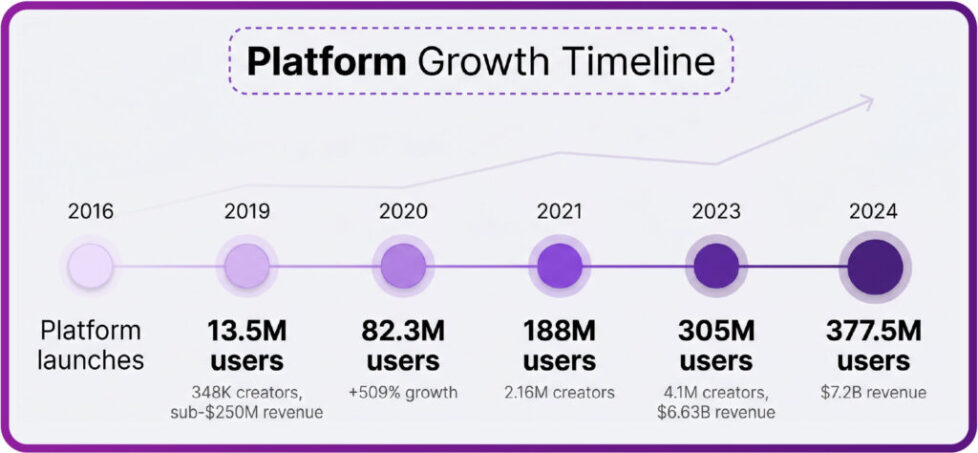
As the platform grew, more readers joined free pages and more of them began asking about the same small line on their statements. The chart above shows how quickly that audience expanded.
What a Card Hold Actually Is
An authorization hold is a message your bank receives when a merchant checks a card. The bank sets aside the requested amount so the merchant knows the funds exist. No money moves at that moment.
A charge is different. A charge is a completed transfer that appears as a posted transaction. Holds show up as pending, while charges show up as final.
Free signups trigger holds because the verification step is separate from the price of the page. The card check runs whether the subscription costs $0 or $49.99. That is why a free page can still produce a pending amount.
Here is what monthly costs tend to look like when you subscribe to a free page and use the optional paid features.
- Month one: $0 subscription, possible temporary hold during verification, no permanent charge.
- Month two: still $0 subscription unless you buy a pay-per-view message or send a tip.
- Month three: the same $0 subscription, with any spending limited to what you choose to unlock.
- Any month with purchases: your own pay-per-view and tip spending, plus the standard platform fee already included in the listed price.
That last point is worth stating plainly. The platform takes 20% of everything, whether it is a subscription, a tip, or a pay-per-view unlock. The creator keeps 80%.
Practical tip: before you enter card details, check whether your bank shows pending transactions separately from your balance. If it does, take a screenshot of your available funds first. That single step prevents most panic when a hold appears minutes later.

Why Free Pages Still Verify Cards
The platform has no built-in discovery feed or directory. Readers find pages through outside sources, including ranking sites such as BestOnlyFans. Because signups come from many directions, card verification acts as a basic filter against fraud and duplicate accounts.
Verification also protects the payment system itself. A card that fails a small authorization check cannot later buy pay-per-view messages or send tips. Checking at signup avoids failed purchases later.
For readers, this means a hold is a normal part of joining, not a sign that something went wrong. Below are the situations where a hold is most likely to appear.
- Creating a new account for the first time on the platform.
- Adding a card that has never been used on the site before.
- Signing up from a new device or an unfamiliar location.
- Subscribing to a free page that still requires payment details on file.
- Re-entering card information after an earlier attempt failed.
The timeline shows how the payment process matured alongside the audience. Verification rules exist because the volume of signups made manual review impossible.
Paid pages follow the same verification path, with one difference. Paid subscriptions range from $4.99 at minimum to $49.99 at maximum, and typical pages sit between $4.99 and $15, averaging $5 to $10. There is no base price below $4.99, though promotional first months may dip under that figure.

How the Small Charge Appears on Statements
On a bank statement, the hold usually appears as a pending transaction. It often carries a shortened version of the merchant name or a processing descriptor. The exact label depends on the bank, not on the site.
Because the label is shortened, readers sometimes do not recognize it. If the amount matches a small verification figure and the status says pending, the label is likely harmless. Compare the date and amount against your signup time before worrying.
The table below lists common labels and what each one typically means.
| Statement label | What it usually means |
| Shortened merchant name, pending | Standard authorization hold from card verification. |
| Generic payment descriptor, pending | Processor hold, released after the check completes. |
| Same amount appearing twice, pending | Two authorization attempts, both should expire. |
| Full subscription amount, posted | A completed charge, not a hold. |
One more detail matters here. When a creator raises the subscription price, auto-renew stops. Existing access lasts until the current paid period ends.
If you cancel during a paid period, access continues until that period ends. A hold is unrelated to cancellation and will clear on its own schedule.

How Long Holds Typically Last
Most authorization holds release within a few business days. Some disappear in hours, while others take longer depending on the bank. Weekends and holidays can add delay because processing slows down. For a starting point, best onlyfans vlog collects free pages.
The hold does not need to be cancelled. It expires when the authorization window closes. Calling the bank is only useful if the amount is still pending well beyond the normal window.
Several factors can change how long the hold stays visible.
- Bank processing speed, which varies widely between institutions.
- Weekend or holiday signups, which push release into the next business window.
- Multiple signup attempts, which can create more than one authorization.
- Card type, since credit and debit cards sometimes release at different speeds.
- Account history, as newer accounts may face longer verification checks.
A quick note on spending expectations. The platform fee of 20% applies to subscriptions, tips, and pay-per-view unlocks alike, so any real charge you make is already priced with that split in mind. Holds never include this fee because no transaction takes place.

When the Hold Looks Wrong
Not every pending amount is a hold. If the status changes from pending to posted, it became a real charge. If the amount matches a purchase you made, it is not a verification hold at all.
Duplicates are the most common false alarm. Two pending lines of the same small amount usually mean two authorization attempts, and both should expire. They are not double charges unless both post.
Below are mistakes readers make when a hold appears.
- Calling the bank immediately instead of waiting for the pending window to close.
- Entering card details again, which can create another authorization.
- Assuming a free page was charged when the line is still pending.
- Disputing a hold as fraud before checking the transaction status.
- Ignoring posted charges that genuinely need to be reviewed.
For context, revenue distribution across creators is uneven, which is one reason ranking sites such as BestOnlyFans exist to help readers compare pages. None of that affects how a hold works on your card.

Preparing Your Card Before Signup
The simplest way to avoid disruption is to sign up when your balance has room for a small temporary reservation. A hold ties up funds briefly, so timing matters more than the amount.
You can also check how your bank displays pending transactions before you start. Knowing the layout in advance makes the hold easier to identify and dismiss.
The table below pairs preparation habits with their tradeoffs.
| Prep habit | Tradeoff to consider |
| Sign up right after a deposit | Balance is comfortable, but the hold may look larger in context. |
| Use a card with available credit | Less impact on cash, but credit limits still absorb the hold. |
| Sign up on a weekday | Faster release, but timing may not suit your schedule. |
| Keep a screenshot of available funds | Useful record, but it must be stored somewhere private. |
Help centre pages explain account and payment basics, but they rarely list bank-specific hold times. Your bank remains the best source for release schedules.
What to Do If a Hold Lingers
If a pending amount remains after several business days, start by checking the transaction status once more. Confirm whether it is still pending or has posted. That distinction decides your next step.
If it is still pending, contact your bank first and ask about the authorization window. If it has posted and you did not make a purchase, contact the platform support channel with the date and amount.
Stay calm and keep the process simple. One message to the bank and one to support is usually enough. Repeated disputes can slow things down rather than speed them up.
While you wait, keep a small set of records so nothing gets lost between conversations.
- The date and time of your signup.
- The exact pending amount and its statement label.
- Screenshots of the pending transaction and your available balance.
- Any ticket numbers or reference codes from bank or support contacts.
Turning on two-step authentication protects the account itself. It does not change how holds work, but it keeps your login secure while payment questions are resolved.
One final reminder. A card hold on a free page is a verification step, not a subscription charge. Free pages earn through pay-per-view messages and tips instead of a monthly fee. If you keep that distinction in mind, the pending line on your statement becomes far less confusing. BestOnlyFans refreshes its rankings every month.
FAQ
Does a free OnlyFans page charge my card at signup?
No. A free page is priced at $0, so no subscription fee is charged. Any small pending amount is a temporary verification hold, not a payment.
Why is there a pending amount if the subscription is free?
The card check runs separately from the subscription price. Verification confirms the card is valid, which is why a hold can appear even when the page costs nothing.
How long does the hold usually stay on my statement?
Most holds clear within a few business days. Weekends, holidays, and individual bank processing speeds can extend that window slightly.
What should I do if the amount becomes a posted charge?
Check whether you made a purchase that matches it. If not, contact your bank and the platform support channel with the date, amount, and label.